
Download VideoNotes – Chrome Apps, Note Taking, Video Synchronization
Overview
VideoNotes is a specialized desktop utility designed to streamline the process of taking notes while watching videos. Developed by UniShared, the software targets students, educators, and professionals who regularly engage with video content for learning, research, or training. It is particularly useful for users of YouTube and Coursera, enabling real-time note-taking alongside video playback. The application allows users to maintain their existing keyboard shortcuts for video controls while simultaneously writing and organizing notes.
One of its core strengths lies in automatic synchronization between notes and video timestamps. By clicking on a specific line of notes, users can instantly jump to the corresponding moment in the video, creating a seamless navigation experience. All notes are securely stored in Google Drive, ensuring accessibility across devices and platforms. This feature is ideal for individuals preparing for exams, attending online courses, or conducting in-depth video research.
While the developer did not provide additional system requirements, the software is compatible with Windows, Mac, and Linux operating systems. It is designed as a lightweight browser-based tool with a footprint of 2.5 MB, making it suitable for users with limited storage. The application runs within supported web browsers, including Chrome, Firefox, Internet Explorer, and Safari, ensuring broad accessibility.
Key Features & Capabilities
- Real-time Note Taking During Video Playback – Users can write notes directly on the same screen as the video, eliminating the need to switch between applications.
- Preserved Keyboard Shortcuts – The tool maintains standard video playback controls (play/pause, skip forward/backward) for uninterrupted viewing.
- Automatic Video-Note Synchronization – Each note is linked to a specific timestamp, allowing instant navigation by clicking on any note line.
- Google Drive Integration – All notes are automatically saved to the user’s Google Drive account, enabling cross-device access and backup.
- Time Code Support – Notes are timestamped, providing a structured timeline for reviewing content.
- Multi-Platform Compatibility – Works on Windows, Mac, and Linux via supported web browsers.
These features are particularly beneficial in academic settings where students watch recorded lectures or tutorial videos. Educators can use the tool to create annotated video resources for their classes. Researchers and content creators may leverage it to organize insights from long-form video content. The integration with Google Drive ensures that notes remain secure and accessible, even if the local device fails or is lost.
User Interface, Workflow & Performance
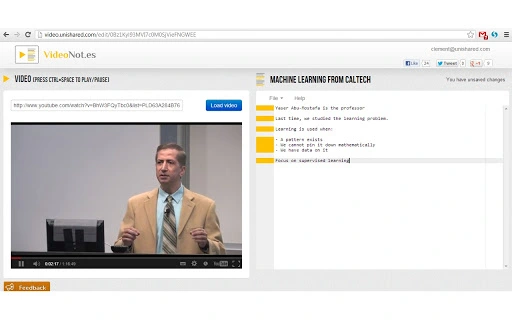
VideoNotes features a clean, minimalist interface designed for focus and efficiency. The layout places the video player and note-taking area side by side, allowing users to monitor both simultaneously. Navigation is intuitive, with minimal on-screen clutter, reducing cognitive load during study or research sessions.
The workflow is streamlined: users open a video on YouTube or Coursera, launch VideoNotes, and begin typing. As they write, the tool automatically captures the current video time, associating it with the note. Clicking on a note instantly rewinds or fast-forwards the video to the relevant point. This bidirectional linking enhances comprehension and retention.
Performance details were not specified by the developer. However, given its lightweight size of 2.5 MB and browser-based nature, it is expected to operate smoothly on modern systems. The application does not appear to consume significant CPU or RAM resources, which is typical for lightweight web tools. Stability is likely consistent, as it relies on well-established browser environments rather than native system components.
Compatibility & System Requirements
VideoNotes is compatible with Windows, Mac, and Linux operating systems. It is designed to function within modern web browsers, including Chrome, Firefox, Internet Explorer, and Safari. The software requires no installation on the device’s operating system, as it operates as a browser-based application.
The installation size is 2.5 MB, indicating a minimal footprint. This makes it suitable for users with limited disk space or older hardware. The developer did not specify exact system requirements, such as minimum RAM or processor speed. However, since it runs in a browser environment, it should perform adequately on systems that support the listed browsers.
Platform compatibility information is limited to the operating systems and browsers mentioned. Users are advised to ensure their browser is up to date to maintain optimal functionality. No additional plugins or extensions beyond standard browser capabilities are required.
Pros and Cons
Pros
- Efficient note-taking during video playback without switching applications
- Automatic synchronization with video timestamps for quick navigation
- Seamless integration with Google Drive for backup and access
- Preserves standard video playback shortcuts for uninterrupted use
- Lightweight design with minimal system resource usage
- Supports major platforms and modern web browsers
Cons
- Dependent on web browser functionality; may be affected by browser updates
- Only supports YouTube and Coursera video platforms
- Relies on internet connectivity for Google Drive synchronization
- No offline mode available (based on current functionality)
- Developer did not provide detailed system requirements
FAQ Section
Is VideoNotes available for all operating systems?
VideoNotes supports Windows, Mac, and Linux operating systems. It operates within compatible web browsers and does not require a native installation.
Can I use VideoNotes without an internet connection?
While the application can be accessed when offline, full functionality—especially note synchronization and Google Drive backup—requires an active internet connection.
Does VideoNotes work with platforms other than YouTube and Coursera?
Currently, VideoNotes is designed to work with YouTube and Coursera videos. Support for other platforms has not been confirmed.
Is my data safe when using Google Drive integration?
Notes are stored in the user’s personal Google Drive account. The developer does not have access to user data, and the integration follows Google’s security protocols.
How often does VideoNotes update?
Updates are released as needed to maintain compatibility with browsers and video platforms. The developer encourages users to keep the tool up to date for optimal performance.
Final Thoughts + CTA
VideoNotes stands out as a focused, practical tool for anyone who frequently watches educational or instructional videos. Its ability to synchronize notes with video timestamps offers a significant improvement over traditional note-taking methods. The integration with Google Drive ensures that valuable insights are preserved and accessible across devices.
While it has limitations—such as platform-specific support and reliance on internet connectivity—the benefits far outweigh the drawbacks for its target audience. Students, educators, and professionals engaged in video-based learning will find this tool invaluable for improving focus, retention, and organization.
With a free pricing model and a lightweight footprint, VideoNotes delivers strong value. Its clean interface and intuitive workflow make it easy to adopt without a learning curve.
Download VideoNotes now







